A very popular IT business model in the last decade is the marketplace ecosystem business model. Widely adopted by Apple, Microsoft, Google, and many others, the main idea is to provide as many services as a user might need via a store or subscription model, typically with products that work seamlessly within their own ecosystem. If a provider can successfully lock in customers, they are likely to remain for a long time.
Nonetheless, this business model does not necessarily align with the flexibility that startups and scaleups need as they mature and often comes at a premium. Once a business commits to a provider, exiting can be difficult and may limit new opportunities.
In this article, we review the concept of business intelligence (BI) in a broader context and evaluate how to maximise the value of data generated by your company. We propose practical approaches to handling data, outlining what is important to consider. Choosing a provider may feel limiting, so maintaining flexibility allows for future adjustments when needed.
Our in-house IT specialist sheds light on the concept of data, discusses key considerations before engaging in ecosystems, and provides tips and insights on how to remain flexible and avoid vendor lock-in.
Key Takeaways
- A less debated disadvantage of marketplace ecosystems is the reduced flexibility of handling data as you see fit.
- Centralised data storage systems are becoming more accessible for less technical profiles.
- Having a centralised data storage system allows for more flexible business decisions and investigations.
What is Business Intelligence?
IT leader IBM defines business intelligence (BI) as follows:
Business intelligence (BI) is a set of technological processes for collecting, managing and analysing organisational data to yield insights that inform business strategies and operations.
In practice, it is commonly associated with:
- Transforming raw data into meaningful insights that drive strategic decision-making within an organisation.
- Enabling business users to access different types of data, historical and current, third-party and in-house, as well as semi-structured and unstructured data such as social media.
- Analysing this information to understand business performance and determine next steps.
From this definition, three distinct concepts emerge: (i) collection or source, (ii) management or ETL (Extraction, Loading & Transforming), and (iii) analysis or insights. Each concept typically requires a separate and specialised approach. Nonetheless, the concept of data within a company can be compared to a supply chain, where management attention is required at every stage.
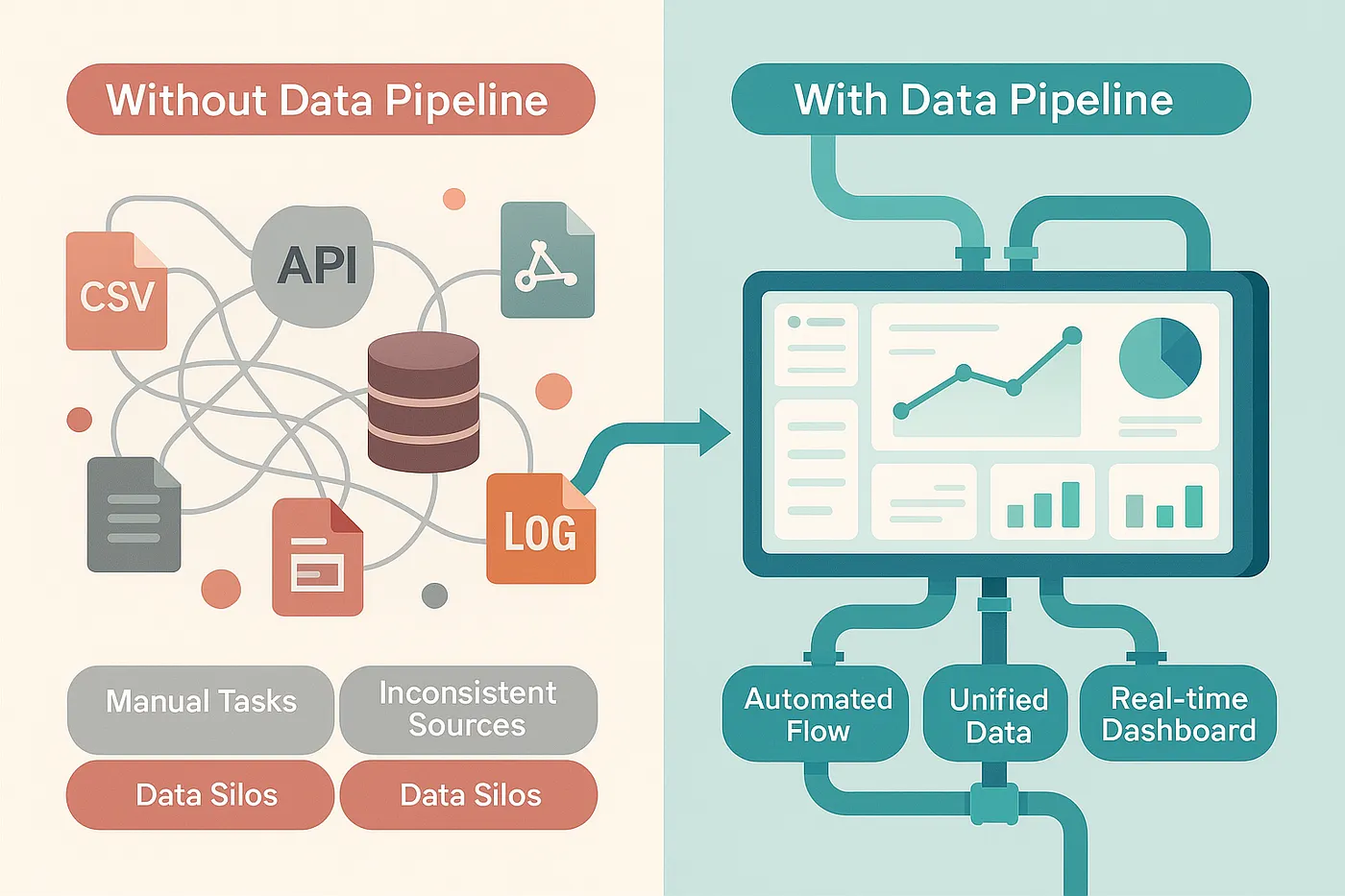
The figure above illustrates typical data fragmentation within businesses compared to a structured approach. The latter begins by properly defining and structuring the data source.
Data as an Asset, Not a Residual Product
There is an abundance of literature on how to collect, clean, and store data. However, few sources address the dilemma of whether to manage your own data source or outsource it. To clarify what this means and how easily restrictions can arise, consider the following example:
We manage all our data in Excel (source) and later query it in Power BI (insights). That way, we visualise our data.
However, we now require function Y, which is not available in our current ecosystem. Switching providers or transferring our data creates significant overhead, preventing us from taking meaningful action.
The key question missing in this scenario is where is the data stored and who controls it? In many cases, it resides in an ecosystem cloud such as M365 OneDrive or Google Drive, stored within a commercial database. By default, this means you do not fully control your own source, which reduces flexibility.
For a long time, this approach was standard because managing your own data required a specialised team to maintain the necessary infrastructure.
Today, this model is being challenged by the rise of easily maintainable databases. Consider DBaaS providers such as Supabase or MongoDB, or broader solutions offered by Amazon Web Services (AWS) and DigitalOcean. While a true setup without non-technical profiles is unlikely, the rise of data analysts creates hybrid profiles with advanced IT knowledge, and the current market has just lowered the bar for these profiles.
An important observation to make is that data stored within proprietary BI tools is often limited in its ability to share data with other analytics platforms. In contrast, nearly all analytics platforms support connections to external databases. Control over the database determines where and how data can be used.
This inevitably leads to the second concept: extraction, loading, and transforming (ETL).
Data Type Matters
You might remember situations where a file could not be opened due to format incompatibility. Databases typically avoid this issue by working with predefined data types. Most commercial software solutions are designed to handle these standardised formats.
Common text-based data formats include DOCX and XLSX, but you are likely also familiar with CSV and JSON. The latter two are non-proprietary formats and enable interoperability across virtually all modern technologies. For this reason, storing captured data in CSV or JSON is often a sensible default.
Keep It Simple
Most modern solutions provide a Graphical User Interface (GUI). DBaaS providers such as Supabase and MongoDB offer low-code or no-code database management solutions (e.g., NoSQL databases) with free tiers for experimentation. These platforms can natively handle CSV and JSON data.
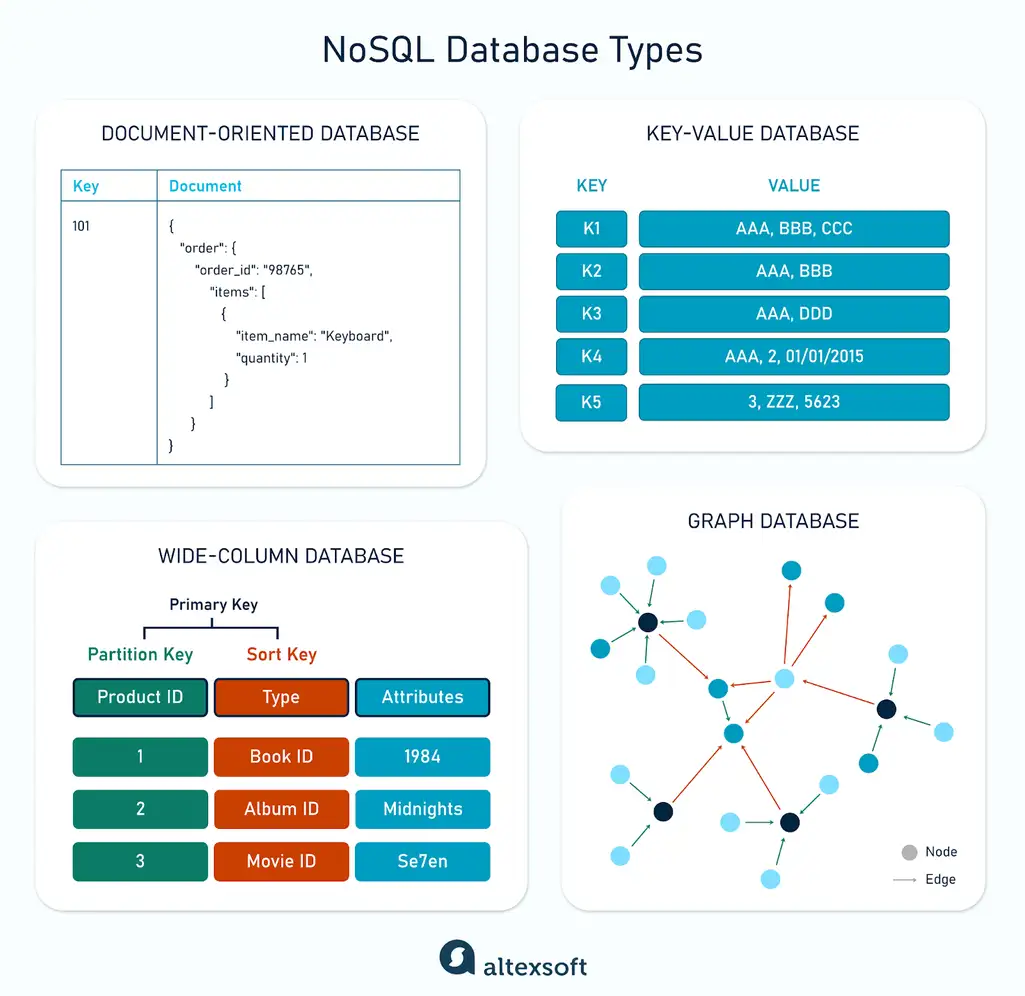
NoSQL databases aim to use concepts that are more intuitive for non-technical users, as illustrated above.
If you have successfully followed a step-by-step installation before, you may consider tools such as pgAdmin or Postgres.app (macOS). Combining a GUI with a cloud database solution enables your company to extract and load data into applications efficiently.
So what is the gain with this setup? First, you manage a single source of truth instead of maintaining separate datasets for product X and product Y across different environments or folders. With a centralised database, there is one authoritative endpoint for data storage and a starting point for distributing data to various applications. This structure provides flexibility in selecting software tools, managing user licenses with precision, and avoiding costly data migrations when adopting new analytics platforms. Database setup is typically a one-time effort that can be largely automated, requiring only clear internal guidelines for data storage and maintenance.
From this perspective, if data is an asset, it will require proper asset management.
IT Insight: Choose your difficulty
The most common database type is the relational database. By organising data into tables, each row receives a unique ID, and relationships are created between tables. This resembles the children’s puzzle of connecting associated words.
An alternative is the document-oriented database. Instead of breaking data into relational structures, information is stored as complete documents. To minimise complexity around data types, defaulting to CSV, JSON, or XML remains a pragmatic choice.
Supabase offers one of the lowest barriers to entry for organisations exploring self-managed data solutions. However, businesses with more advanced requirements might outgrow it.
In such cases, DigitalOcean’s managed PostgreSQL databases can provide greater flexibility without requiring deep technical specialisation.
Now developing a proper data pipeline can begin! Prioritise simplicity with Supabase or document-oriented databases, or opt for PostgreSQL with a managed service provider for greater scalability and control. And when in trouble, RTFM.
Connect to All
Where you take it from here, really depends on what you want to achieve. A quick Google search ‘what commercial products can you connect a database to‘ or a friendly prompt on your favourite AI-chatbot, will give some inspiration. But if you want more concrete examples, consider the following examples:
Microsoft and PowerBI
Microsoft’s Power Query allows for the ETL of your data and connects it to Excel, PowerBI or other M365 products. While dashboarding is useful, you should focus on key data points you’d like to track. Whether they are sales-related, stock-related or something else, be sure not to over-engineer dashboards, as they will quickly lose their purpose. Better five categorised dashboards with two or three parameters than one with all!
Notable alternatives
- Salesforce’s Tableau: similar to PowerBI, though often criticised for its complexity.
- Google’s Looker Studio: Best known because it’s free, though enterprise-grade solutions require a paid Pro-subscription.
- Datawrapper: A German alternative, easy-to-use, well documented and preferred by some because it falls under EU Privacy regulations.
- Graphy and Quadratic: for pioneers who are looking to implement AI insights into their data.
Savings vs Strategy
Gaining greater control over your data does not automatically result in cost savings. As discussed earlier, the marketplace ecosystem business model is highly profitable from the provider’s perspective. However, in practice, the broad generalisation of business intelligence within such ecosystems often loses value due to built-in limitations, which can lead to forced add-ons or subscription upgrades accessible only to those willing or able to pay.
From a business standpoint, consider the tools you disregard because they are too expensive, or those you avoid because they fall outside your chosen ecosystem and switching would require significant effort. While at a minimum, a centralised database combined with Excel can support core operations across an entire organisation.
The true strategic value of controlling your own data source is to limit restrictions on the capabilities of what you can do with that data.
An illustrative overview of what a centralised database can supply:
| Department | Primary Software | Typical Use | Connection to Own Database |
|---|---|---|---|
| Sales | Salesforce Sales Cloud | CRM, pipeline management | Bi-directional sync via API / ODBC |
| Accounting | SAP S/4HANA | General ledger, invoicing, reporting | Direct connector / ETL |
| Marketing | HubSpot | Campaigns, leads, attribution | API sync (read/write) |
| HR | Workday HCM | Payroll, contracts, absences | Scheduled export/import |
| Operations | Microsoft Power BI | Analytics, dashboards | Live query to internal DB |
| Management | Salesforce Tableau | Executive reporting | Read-only analytics connection |
Databases can be managed through user roles and permissions at the source level. This reduces the need to configure access rights separately within each application, lowers administrative overhead, and streamlines data flow throughout the organisation.
As a final consideration, reflect on the variety of vendors referenced earlier. If each of them serves as a separate data source, your information becomes fragmented across multiple ecosystems, each required for its respective applications. While centralising your data and providing the necessary flexibility may ultimately represent the true definition of business intelligence.
Conclusion
Many present day business do not own the storage of their data, which limits their ability to experiment with new ideas, gain new insights or lead to lost opportunities.
The lowered bar for working with, and understanding how to work with centralised database systems, still requires certain technical profiles. But the level has been adjusted to experienced Excel users rather than IT master’s degrees. Being able to centralise data allows you to be less dependent on proprietary ecosystems and allows for far greater experimental, investigative and resourceful solutions in a time when trends come and go faster than one can blink.
At CFOrent, we investigate new ways of leveraging modern tools to create better, clearer and easier solutions for gaining insights. These insights form the foundation for operational and strategic decisions for ourselves and our clients. Feel free to get in touch and discover how we, as a partner, can elevate insights into your data and guide you to maximise your insights.